

Does Your Ageing PC Need Replacing? The Windows Dates That Matter in 2026 and 2027
You may have seen a viral video doing the rounds saying you need to “stop buying Windows laptops right now” because NVIDIA has “taken over” and the computer you’ve used for years “is disappearing”. It’s a catchy hook, but it mixes one real new product with a lot of scare.
Here’s the good news: nobody needs to bin a working PC because of a new chip. What does matter for ageing PCs and laptops is a short list of Windows dates, and they’re easy to plan around.
In this guide we fact-check the video, explain the dates that actually affect older computers, and show you how to work out whether your PC needs an upgrade, a replacement, or nothing at all.
The Short Answer
- Already on Windows 11? You’re fine. Keep Windows Update switched on.
- On Windows 10, but your PC can run Windows 11? Upgrade to Windows 11. It’s free for eligible PCs.
- On Windows 10 and your PC can’t run Windows 11? Sign up for Extended Security Updates (ESU) to stay protected until 12 October 2027 (there’s a free option), and plan to replace it before then.
- Thinking about a new NVIDIA RTX Spark laptop? Great machines for creative and AI work, but you don’t need one to keep using Windows.
Fact-Checking the Viral Video
| The claim | What’s actually true |
|---|---|
| NVIDIA has a new “RTX Spark” chip for Windows laptops | True. NVIDIA and Microsoft announced RTX Spark in May 2026, and the first laptops went on sale on 16 October 2026 from ASUS, Dell, HP, Lenovo, Microsoft and MSI. |
| Microsoft’s new Windows requirements are forcing everyone onto this new chip | False. Windows 11’s minimum requirements haven’t changed to require RTX Spark or an AI chip. Windows 11 still runs on regular Intel and AMD PCs, and those are still sold and supported. |
| You should stop buying Windows laptops | Misleading. A Windows 11 laptop you buy today will keep getting updates. The real deadline to watch is Windows 10’s, not the arrival of a new chip. |
| Laptops are becoming sealed units you can’t upgrade | Partly true. On RTX Spark laptops the memory is built in, so you can’t add more later. Many thin laptops already work this way. It’s a reason to buy the right amount of memory upfront, not a reason to avoid Windows. |
The Dates That Actually Matter
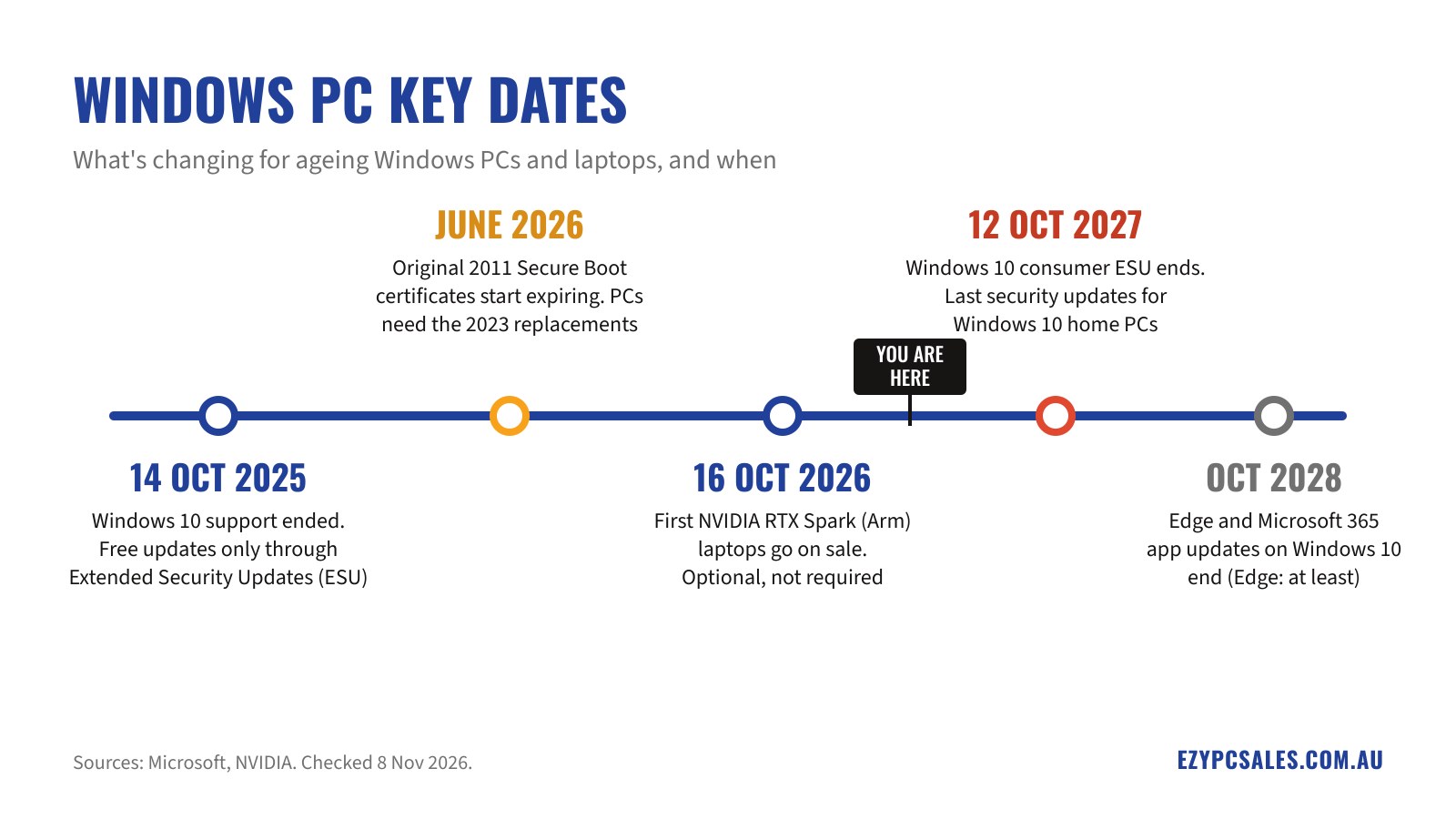
14 October 2025: Windows 10 support ended
Microsoft stopped providing free security updates for Windows 10 on this date. Windows 10 PCs still turn on and work, but without updates they become easier targets for viruses and scams over time. The way to keep a Windows 10 PC protected is Extended Security Updates (ESU).
June 2026: Secure Boot certificates began expiring
Secure Boot helps stop malicious software from loading before Windows starts. The original Microsoft certificates behind it date from 2011 and began expiring in late June 2026. Microsoft is rolling out 2023 replacements through Windows Update, and some PCs also need a BIOS (firmware) update from the manufacturer.
Your PC won’t stop booting if it misses the change. But it can’t receive future boot-level security fixes, which Microsoft calls a “degraded security state”. Many PCs built since 2024 already have the new certificates.
12 October 2027: Windows 10 ESU ends for home users
Consumer ESU was originally due to finish on 13 October 2026. In June 2026 Microsoft extended it by a full year, to 12 October 2027. If your PC is already enrolled, you don’t need to do anything: your cover carries on automatically through to that date. After it, Windows 10 home PCs get no more security updates, so this is your real replacement deadline.
How to get ESU (it doesn’t have to cost much)
ESU for home users isn’t an expensive business contract. To enrol, your PC needs Windows 10 version 22H2 with the latest updates, and you sign in with a Microsoft account. Then choose one of three options:
| Option | Cost | How it works |
|---|---|---|
| Windows Backup | Free | Turn on Windows Backup so your PC settings sync to your Microsoft account |
| Microsoft Rewards | 1,000 points | Redeem points you’ve earned using Bing, Edge and other Microsoft services |
| One-off purchase | US$30 plus tax (roughly A$45; the exact local price shows at checkout) | A single payment, and one licence covers up to 10 PCs on the same Microsoft account |
To sign up, open Settings > Update & Security > Windows Update and look for the Extended Security Updates option.
Your apps keep getting updates for longer
Some key Microsoft apps on Windows 10 are supported beyond the Windows deadline, so they won’t suddenly stop working:
- Microsoft Edge and WebView2: updates continue on Windows 10 (version 22H2) until at least October 2028, with or without ESU. WebView2 is the behind-the-scenes part many other apps use to display web content.
- Microsoft 365 apps (Word, Excel, Outlook and so on): security updates continue on Windows 10 until 10 October 2028, as long as your subscription is active. New features stopped with version 2608 in August 2026, so you’ll only get fixes, not new tools.
This gives you breathing room to plan, but it isn’t a reason to stay on Windows 10 for good. Up-to-date apps can’t protect a computer whose operating system has stopped getting security fixes. Treat 12 October 2027 as your deadline.
Is Your PC Windows 11 Ready?
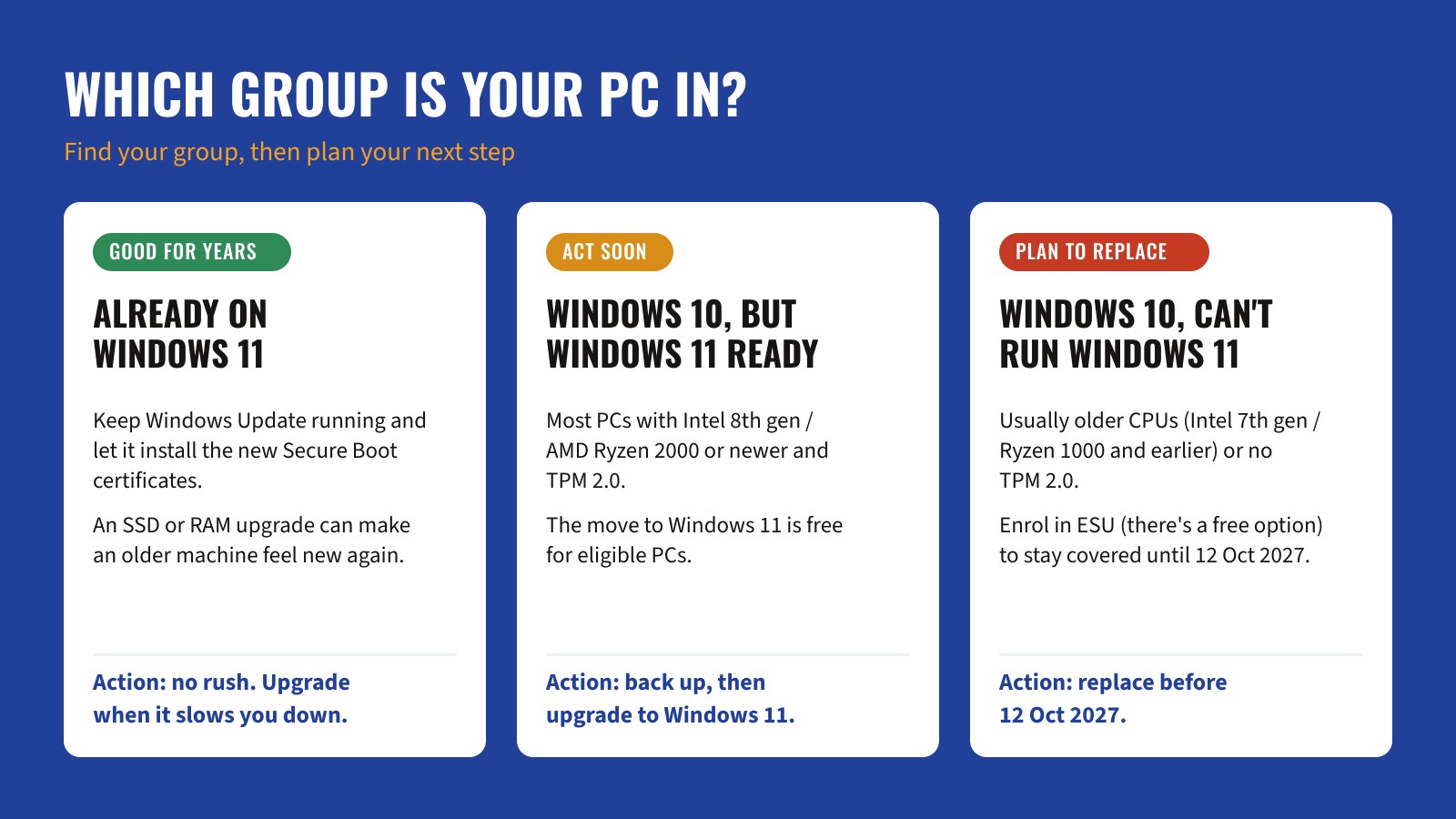
Windows 11 needs a 64-bit processor from a supported list, 4GB of RAM, 64GB of storage, UEFI firmware with Secure Boot capability, and a TPM 2.0 security chip. In practice that usually means:
- Intel: 8th generation Core (around 2017–2018) or newer.
- AMD: Ryzen 2000 series or newer.
How to check in two minutes:
- Open Settings > Update & Security > Windows Update. If your PC is eligible, Windows will say it can run Windows 11 and offer the upgrade.
- For more detail, run Microsoft’s free PC Health Check app. It tells you exactly what’s missing.
- To see your processor, go to Settings > System > About.
Upgrade or Replace? What to Do and When
| Your PC | What to do | By when |
|---|---|---|
| Already on Windows 11 | Keep Windows Update on and install any BIOS updates from your PC maker. An SSD or extra RAM can add years of life | No deadline |
| Windows 10, Windows 11 ready | Back up your files, then upgrade to Windows 11 for free. If it’s slow, an SSD upgrade often helps more than a new PC | Before 12 Oct 2027, ideally now |
| Windows 10, not Windows 11 ready | Enrol in ESU now to stay protected, then budget for a replacement | Replace before 12 Oct 2027 |
| Very old or failing (slow hard drive, worn battery, cracked screen) | Get a quick check before spending money. Repair costs can exceed the value of the machine | Whenever it’s holding you back |
Don’t wait until October 2027. Memory makers have been prioritising AI data centres, and RAM and SSD prices rose sharply through 2026. That’s pushed up the price of many new PCs and laptops, so it pays to plan ahead rather than buy in a rush at the deadline.
What About RTX Spark and “AI PCs”?
RTX Spark is a new kind of Windows laptop. It combines an NVIDIA graphics chip and an Arm-based processor in a single chip, with up to 128GB of shared memory. NVIDIA rates it at up to 1 petaflop of AI performance. It’s aimed at creators, 3D and video work, gaming in a slim laptop, and running AI tools on the laptop itself.
A few things to know before you buy one:
- They’re premium. Microsoft’s Surface Laptop Ultra with RTX Spark starts at AU$4,399 on Microsoft’s Australian store (checked 7 November 2026).
- The memory can’t be upgraded later. Choose what you need at checkout.
- Arm is a different chip design. Most everyday Windows apps work, and older apps run through Microsoft’s built-in emulation. If you rely on specialist software, older printers or other hardware, check it supports Windows on Arm first.
You’ll also see “Copilot+ PC” stickers. These PCs have a built-in AI chip (an NPU of 40+ TOPS) and at least 16GB of RAM, which some newer Windows AI features need. They’re nice to have, not required. Email, banking, browsing, Office and video calls all run fine on a regular Windows 11 PC.
Our Advice for Most People
- If your PC is Windows 11 ready, upgrade it rather than replace it, and consider an SSD upgrade if it feels slow.
- If it isn’t, enrol in ESU today so you’re protected, then replace it in your own time before 12 October 2027.
- When you buy new, aim for 16GB of RAM and an SSD. It keeps the machine comfortable for years, and on many thin laptops the memory can’t be added later.
- Only pay extra for an RTX Spark or AI-focused laptop if you’ll actually use the creative, gaming or AI power.
Bring It to the Bench: Help on Bribie Island
If you’d rather not sort this out yourself, book a visit to our workshop at 13 Sunset Ave, Bongaree. We can help with:
- A quick hardware check: we’ll tell you whether your PC can go straight to Windows 11, checking the processor generation and TPM 2.0 chip, and what it needs if it can’t.
- ESU setup: if you’d like to keep using Windows 10 safely until October 2027, we’ll help with your Microsoft account sign-in, Windows Backup and ESU enrolment.
- A speed boost: swapping an old mechanical hard drive for a solid-state drive (SSD) is often the single biggest speed-up for a PC you’re not ready to replace. Adding RAM can help too.
- Moving to a new PC: when it’s time to replace it, we’ll set up the new machine and move your files across.
Bookings are essential, so get in touch to arrange a time. Ready for a new one? Browse our Windows laptops and desktop computers.
Sources
- Microsoft Windows Experience Blog: RTX Spark announcement, 31 May 2026
- NVIDIA Newsroom: RTX Spark PCs available, 16 October 2026
- Microsoft support: Windows 10 consumer Extended Security Updates (program ends 12 October 2027)
- Microsoft: Secure Boot certificate updates, 2026
- Microsoft support: Microsoft Edge and WebView2 on Windows 10 (updates until at least October 2028)
- Microsoft: Microsoft 365 Apps on Windows 10 (security updates until 10 October 2028)
- Microsoft Store Australia: Surface Laptop Ultra pricing, checked 7 November 2026